SMIA ecosystem: SMIA-I KB
SMIA-I KB (Knowledge Base) provides system information to identify SMIA agents and their CSS functional information for dynamic scenarios. This Knowledge Base offers identifying manufacturing capabilities and associated SMIA instances. The suffix “-I” denotes its function as a support infrastructure component for SMIA instances but not an agent itself, offering complete decoupling.
Note
SMIA-I KB has been used in the Flexible small-scale manufacturing, which has an associated visual resource available on Youtube.
Source Code Reference
The SMIA-I KB leverages an OWL ontological database, enabling efficient management of CSS-related information. Developed in Python, it leverages OWLready2, the same ontology library as SMIA. To ensure consistency in its connectivity with the external infrastructure, a homogeneous interaction pattern based on the OpenAPI specification is used.
Link to SMIA-I KB source code
Deployment Environment
SMIA-I KB can be deployed locally by downloading the source code and simply running the module in the src directory with python -m swagger_server. However, it is recommended to deploy it in a virtualized environment for a self-contained deployment environment. The Docker image of the SMIA-I KB is available in the SMIA Docker Hub.
A valid virtualized environment containing SMIA-I KB can be easily generated using the tool provided in this documentation platform: SMIA Environment Builder. To achieve the desired result, in step 2 SMIA-I KB must be selected within the infrastructure components.
The deployment command depends on the selected virtualization environment: Docker Compose (docker compose up) or Kubernetes (kubectl apply -f deploy/). Once deployed, the SMIA-I KB initializes the server and exposes its REST API at the configured port.
Note
As mentioned in the SMIA Environment Builder, if SMIA-I KB is deployed for the SMIA agentic environment, the deployment of the SMIA ecosystem: SMIA ISM infrastructure component is required to mediate agent interactions with the Knowledge Base.
Interface and Interaction
The SMIA-I KB exposes a homogeneous and standardized HTTP/REST API following the OpenAPI 3.0.4 specification, built on top of Flask Python package. This API provides full programmatic control over the Capability-Skill-Service (CSS) model Knowledge Base, enabling SMIA agents and external manufacturing applications to query capabilities, manage skill parameters, and discover registered SMIA agent instances. All ontology resources (capabilities, skills, constraints, SMIA instances, etc.) are managed through this API, which acts as the exclusive interaction gateway for external components such as SMIA agents (mediated by SMIA ISM) and the AAS Repository.
Note
The SMIA-I KB server listens on port 8080 and exposes the API at the base path /api/v3. It is recommended to containerize it, since it is available as a Docker image under ekhurtado/smia-tools:latest-smia-kb.
API overview
Base URL |
|
Content Type |
|
Specification |
OpenAPI 3.0.4 |
Identifier Encoding |
Ontology IRIs must be Base64-URL-encoded when used as path parameters. The Serialization API provides encode/decode utilities for this purpose. |
Tip
SMIA-I KB also offers a web-based graphical interface accessible via the path /api/v3/ui/. It provides detailed information on the complete API, as well as interactive utilities that allow users to send HTTP requests to each specific API and receive the response, along with examples to ensure that these requests comply with the specification.
API reference
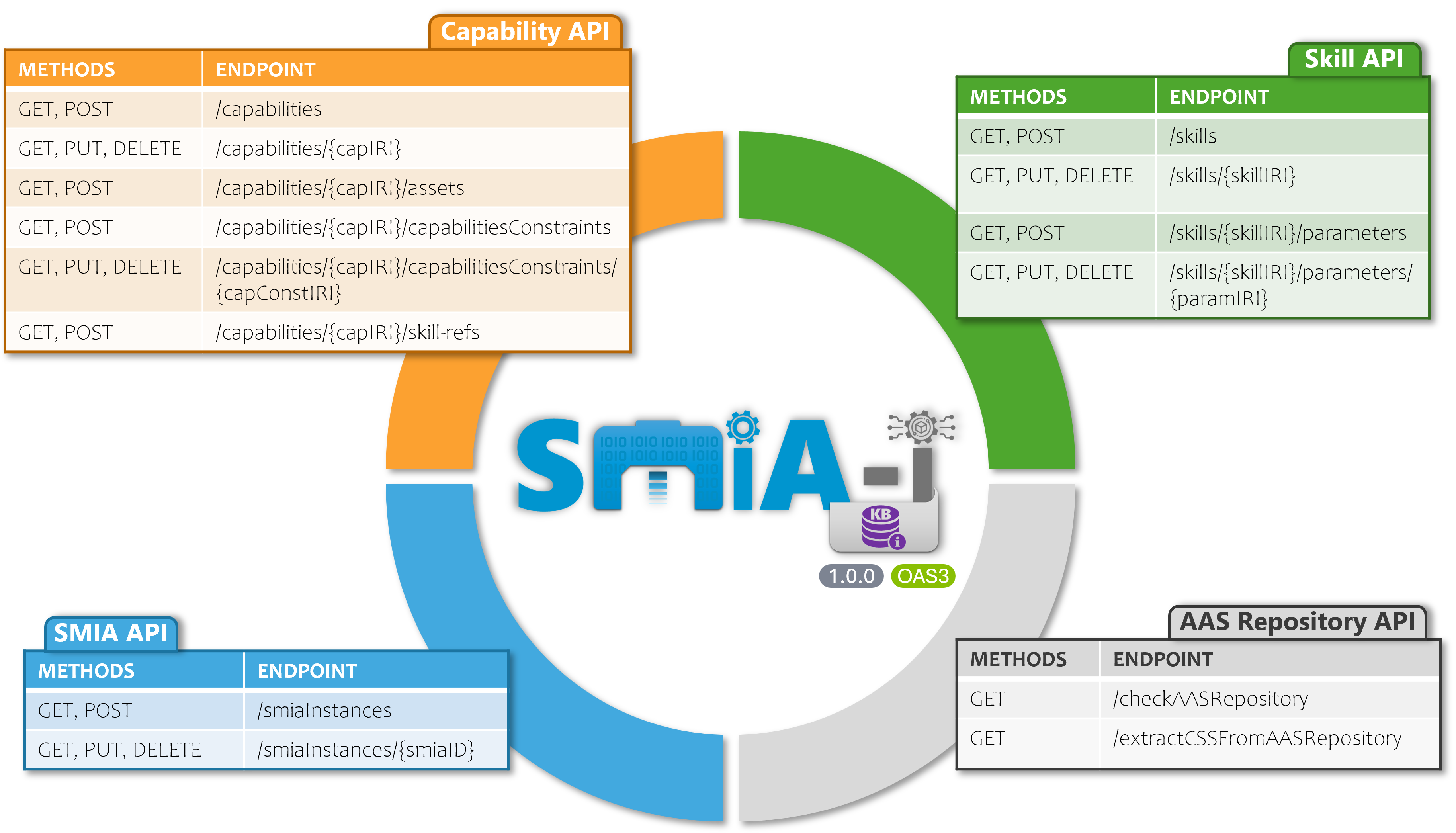
Figure: SMIA-I KB interface
The API is organized into several functional areas corresponding to the CSS (Capability-Skill-Service) model and SMIA operative environment. The Figure: SMIA-I KB interface illustrates the main resource groups. The following list provides details on each of them.
Note
The Serialization API is not shown in the figure because it does not interact with the internal database. It provides useful endpoints for users working with AAS and OWL identifiers (capabilityIdentifier, skillIdentifier), since the OpenAPI specification requires Base64-URL-encoded parameters. The Serialization API provides encode/decode utilities for this purpose.
Capability API
This API manages the Capability layer of the CSS model, providing endpoints for creating, reading, updating, and deleting Capabilities and their related elements (constraints, skill references, assets).
Path |
Method |
Description |
Parameters |
|---|---|---|---|
|
GET |
Returns all capabilities |
|
POST |
Add a new capability |
Body: |
|
|
GET |
Returns all capability IRI identifiers |
|
|
GET |
Returns a specific capability |
Path: |
PUT |
Updates an existing capability |
Path: |
|
DELETE |
Deletes a specific capability |
Path: |
|
|
GET |
Returns skill references of a capability |
Path: |
POST |
Add a skill reference to a capability |
Path: |
|
|
GET |
Returns constraints of a capability |
Path: |
POST |
Add a constraint to a capability |
Path: |
|
|
GET |
Returns a specific constraint |
Path: both identifiers (Base64) |
PUT |
Updates a constraint |
Path: both identifiers; Body: |
|
DELETE |
Deletes a constraint |
Path: both identifiers |
|
|
GET |
Returns assets of a capability |
Path: |
POST |
Add an asset to a capability |
Path: |
Skill API
This API manages the Skill layer of the CSS model, providing endpoints for creating, reading, updating, and deleting Skills and their associated parameters.
Path |
Method |
Description |
Parameters |
|---|---|---|---|
|
GET |
Returns all skills |
|
POST |
Add a new skill |
Body: |
|
|
GET |
Returns all skill IRI identifiers |
|
|
GET |
Returns a specific skill by IRI |
Path: |
PUT |
Updates an existing skill |
Path: |
|
DELETE |
Deletes a skill |
Path: |
|
|
GET |
Returns parameters of a skill |
Path: |
POST |
Add a parameter to a skill |
Path: |
|
|
GET |
Returns a specific parameter |
Path: both identifiers (Base64) |
PUT |
Updates a skill parameter |
Path: both identifiers; Body: |
|
DELETE |
Deletes a skill parameter |
Path: both identifiers |
SMIA API
This API manages deployed SMIA agent instances, providing endpoints for registering and querying SMIA instances that are part of the normalized manufacturing ecosystem.
Path |
Method |
Description |
Parameters |
|---|---|---|---|
|
GET |
Returns all registered SMIA instances |
|
POST |
Register a new SMIA instance |
Body: |
|
|
GET |
Returns all SMIA instance identifiers |
|
|
GET |
Returns a specific SMIA instance |
Path: |
PUT |
Updates an existing SMIA instance |
Path: |
|
DELETE |
Deletes a SMIA instance |
Path: |
AAS Repository API
This API manages the interaction with an AAS server, providing endpoints for integrating with an AAS Repository to automatically extract CSS information into the Knowledge Base.
Path |
Method |
Description |
Parameters |
|---|---|---|---|
|
GET |
Checks availability of the AAS Repository |
Query: |
|
GET |
Extracts CSS information from the AAS Repository |
Query: |
Serialization API
Utility endpoints for encoding and decoding ontology IRIs in Base64-URL format. These are essential for constructing path parameters in the Capability and Skill API endpoints, which require encoded identifiers.
API schemas
The following schemas define the data structures that are used in request bodies and responses across the API. Although the format is defined in an abstract manner and supports both JSON and XML serialization, it is recommended to use JSON.
Capability schema
Field |
Type |
Req. |
Description |
|---|---|---|---|
|
|
Yes |
Unique ontology IRI identifier (e.g., |
|
|
Yes |
Name of the capability (e.g., |
|
|
Yes |
|
|
|
Yes |
|
|
|
Yes |
Skill IRIs that realize this capability |
|
|
Yes |
Assets that can perform this capability |
|
|
No |
Constraints that restrict this capability |
Skill schema
Field |
Type |
Req. |
Description |
|---|---|---|---|
|
|
Yes |
Unique ontology IRI identifier |
|
|
Yes |
Name of the skill (e.g., |
|
|
No |
Skill interface IRIs through which the skill is accessible |
|
|
No |
Associated skill parameters |
|
|
No |
Implementation type (e.g., |
SMIAinstance schema
Field |
Type |
Req. |
Description |
|---|---|---|---|
|
|
Yes |
SMIA instance identifier (e.g., |
|
|
Yes |
Associated asset information |
|
|
Yes |
AAS identifier of the instance |
|
|
No |
Current status (e.g., |
|
|
No |
Unix timestamp of when the instance started |
|
|
No |
SMIA software version (e.g., |
Asset schema
Field |
Type |
Req. |
Description |
|---|---|---|---|
|
|
Yes |
Asset identifier (e.g., |
|
|
Yes |
|
|
|
No |
AAS reference for the asset |
CapabilityConstraint schema
Field |
Type |
Req. |
Description |
|---|---|---|---|
|
|
Yes |
Unique ontology IRI identifier |
|
|
Yes |
Name of the constraint (e.g., |
|
|
Yes |
|
SkillParameter schema
Field |
Type |
Req. |
Description |
|---|---|---|---|
|
|
Yes |
Unique ontology IRI identifier |
|
|
Yes |
Name of the parameter (e.g., |
|
|
Yes |
|
Usage Examples
HTTP requests examples
Retrieve all capabilities
curl -X GET "https://<IP>:<PORT>/api/v3/capabilities" \
     -H "Accept: application/json"
Register a new SMIA instance
curl -X POST "https://<IP>:<PORT>/api/v3/smiaInstances" \
     -H "Content-Type: application/json" \
     -d '{
       "id": "agentInstance001",
       "asset": {
         "id": "http://example.com/ids/asset001",
         "kind": "Instance"
       },
       "aasID": "http://example.com/ids/aasElement001",
       "status": "Running",
       "smiaVersion": "0.3.3"
     }'
Encode an IRI for use as a path parameter
curl -X PUT "https://<IP>:<PORT>/api/v3/serialization" \
     -H "Content-Type: application/json" \
     -d '"http://name.org/css-smia#Capability01"'
Check AAS Repository availability
curl -X GET "https://<IP>:<PORT>/api/v3/checkAASRepository?AASRepositoryURL=http://<AAS server IP>:<AAS server PORT>"
FIPA-SMIACL examples
Access to SMIA-I KB from an SMIA agent is provided through the SMIA ISM infrastructure component, to ensure decoupling from external services and keep the agent environment fully standardized. The code provided is part of a SPADE behavior, which is responsible for sending messages.
See also
The SMIA ISM component is detailed on its dedicated documentation page: SMIA ecosystem: SMIA ISM.
from smia.logic import inter_smia_interactions_utils, , acl_smia_messages_utils
from smia.utilities.aas_related_services_info import AASRelatedServicesInfo
from smia.utilities.fipa_acl_info import FIPAACLInfo, ACLSMIAOntologyInfo, ACLSMIAJSONSchemas

# Obtain all the asset identifiers associated to the given capability
smia_i_kb_api_body = await acl_smia_messages_utils.
        generate_json_from_schema(ACLSMIAJSONSchemas.JSON_SCHEMA_AAS_INFRASTRUCTURE_SERVICE,
        serviceID=AASRelatedServicesInfo.AAS_INFRASTRUCTURE_DISCOVERY_SERVICE_GET_ALL_ASSET_BY_CAPABILITY,
        serviceType=AASRelatedServicesInfo.AAS_SERVICE_TYPE_DISCOVERY, serviceParams=capability_iri)
request_assets_acl_msg = await inter_smia_interactions_utils.create_acl_smia_message(
        f"{AASRelatedServicesInfo.SMIA_ISM_ID}@"
        f"{await acl_smia_messages_utils.get_xmpp_server_from_jid(self.myagent.jid)}",
        await acl_smia_messages_utils.create_random_thread(self.myagent), FIPAACLInfo.FIPA_ACL_PERFORMATIVE_REQUEST,
        ACLSMIAOntologyInfo.ACL_ONTOLOGY_AAS_INFRASTRUCTURE_SERVICE, protocol=FIPAACLInfo.FIPA_ACL_REQUEST_PROTOCOL,
        msg_body=smia_i_kb_api_body)
await self.send(request_assets_acl_msg)