Flexible small-scale manufacturing
This use case represents a flexible production scenario, in which some different asset will interact to realize production plans. SMIA is leveraged to represent both reactive assets that offer the capabilities to meet manufacturing demands, and logical assets responsible for orchestration through the SMIA PE proposal. Furthermore, humans are integrated as part of the execution of manufacturing tasks, assuming a productive role rather than a coordinating one. Consequently, this scenario evaluates the automation of flexible production processes through a fully collaborative SMIA-based system. This page will detail the use case in relation to its development and implementation and the results obtained.
Note
All the resources developed in the case study are available in the SMIA repository on GitHub. The use case was validated with SMIA version 0.3.0.
Description of the use case
To validate the solution in a suitable environment, it must feature a flexible production system with different types of assets and different functionalities. The selected demonstrator is therefore a small-scale production system based on Fischertechnik infrastructure, comprised of several machines and warehouses: two punching machines, two indexed lines and one industrial robot. These assets present different functionalities such as transportation, punching or drilling of workpieces. To this infrastructure, a human operator has been added as a new type of asset, capable of transportation and visual inspection of machines’ operation.
Regarding asset control, the punching machines and indexed line are controlled by IEC 61313-3 programs running on a Modicon M340 programmable logic controller (PLC), the ABB robot is controlled by a RAPID-based program, and the human operator has an associated web graphical user interface (GUI). In terms of connectivity, the Fischertechnik infrastructure is accessed through HTTP-based middleware implemented with Node-RED, which modifies the necessary PLC memory using the Modbus protocol. In the case of the human operator, since the web GUI has been developed using SPADE’s native web functionalities, it can be directly accessed.
To effectively validate the solution with the demonstrator, it is necessary to identify the functionalities and capabilities of the assets. Since the SMIA approach works with the CSS model as a functional model, the following table presents the CSS information of the assets, as well as the interface to access them.
Identification of demonstrator assets and their capabilities and interfaces.
Asset |
Capability (ies) |
Capability constraints |
Accessible through |
|---|---|---|---|
Industrial robot |
Transportation |
Weight (max 1 kg) |
HTTP/REST |
Punching machine A |
Punching |
Strength (max 1N) |
HTTP/REST |
Punching machine B |
Punching |
Strength (max 10N) |
HTTP/REST |
Indexed line machine A |
DrillingAndMilling |
Depth (max 5cm) |
HTTP/REST |
Indexed line machine B |
DrillingAndMilling |
Depth (max 7cm) |
HTTP/REST |
Human operator |
Transportation, VisualInspection |
Weight (max 3 kg) |
Web GUI |
Production plans
To efficiently validate the SMIA approach to flexible manufacturing, two production plans have been designed using Camunda Modeler:
Production A: focused on automatic production through distributed asset selection
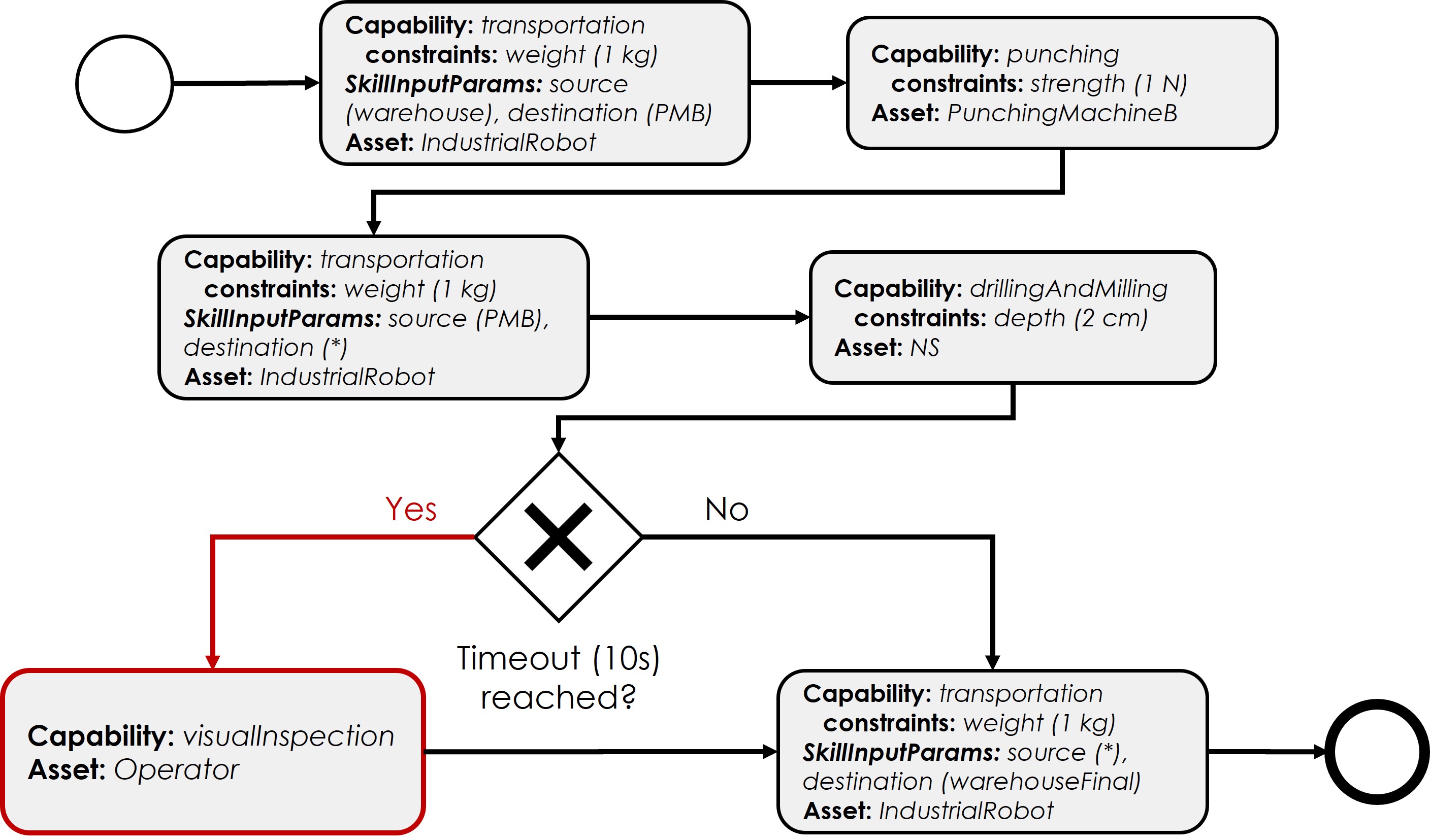
Figure: Use case validation: production plan A
Production B: focused on collaborative production between humans and machines through restricted capabilities for asset selection.
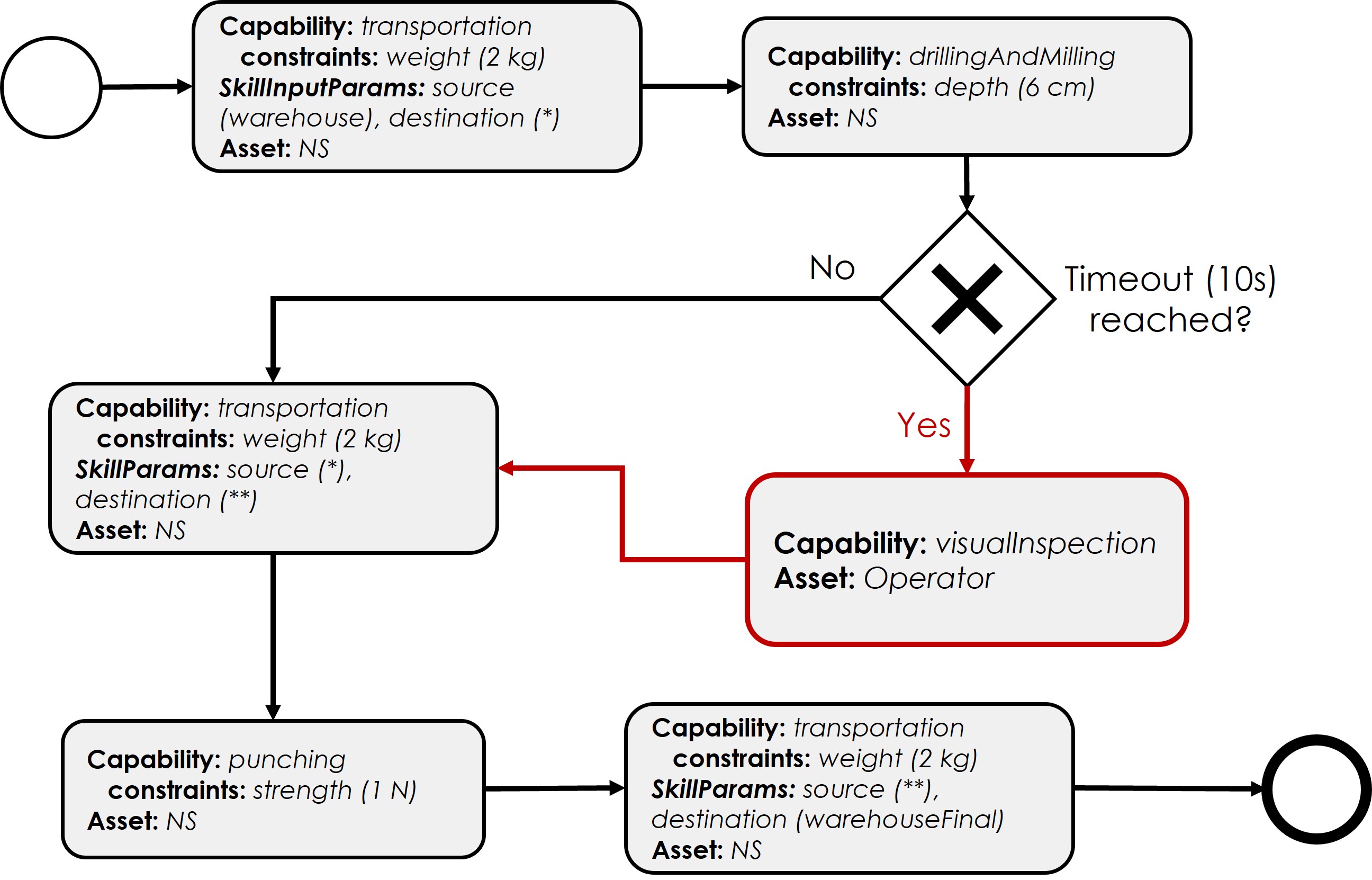
Figure: Use case validation: production plan B
See also
These plans were designed using the dedicated SMIA plugin for Camunda Modeler, which provides CSS-driven BPMN workflows that are valid for SMIA PE. More information is available at SMIA ecosystem: Camunda Modeler
Development of the use case
For assets based on Fischertechnik infrastructure, only the associated AAS models need to be developed, as SMIA v0.3.0 (on which this use case is based) already has HTTP asset connection support.
For human operators, as control is performed via a web graphical user interface developed with native SPADE tools, it can be hosted within the SMIA agent. A special type of SMIA software has been developed for this type of asset: SMIA HI (Human Interface). These types of SMIA instances have the web graphical user interface integrated within the agent along with the necessary controllers to manage it.
Note
The SMIA HI can be used via its Docker image: ekhurtado/smia-tools:latest-smia-hi. Its source code is also available at https://github.com/ekhurtado/SMIA/tree/main/additional_tools/smia_hi.
Deployment of the use case
For this use case it has been decided to deploy SMIA using the Docker Compose method, as it offers the possibility of a self-contained deployment. This way, everything necessary is added in the docker-compose-yml file and the complete use case can be deployed with a simple command, as Docker Compose takes care of starting the containers and enabling communication between them. All the necessary infrastructure has also been added, as well as the dependency between them using the depends_on attributes.
docker-compose up
docker-compose.yml file of the use case
services:

  # ----------------------------------------
  # AAS Infrastructure services (from BaSyx)
  # ----------------------------------------
  aas-env:
    image: eclipsebasyx/aas-environment:2.0.0-SNAPSHOT
    container_name: aas-env
    environment:
      - SERVER_PORT=8081
    volumes:
      - ./aas:/application/aas
      - ./basyx/aas-env.properties:/application/application.properties
    ports:
      - '8081:8081'
    restart: always
    depends_on:
      aas-registry:
        condition: service_healthy
      sm-registry:
        condition: service_healthy
      mongo:
        condition: service_healthy
  aas-registry:
    image: eclipsebasyx/aas-registry-log-mongodb:2.0.0-SNAPSHOT
    container_name: aas-registry
    ports:
      - '8082:8080'
    environment:
      - SERVER_PORT=8080
    volumes:
      - ./basyx/aas-registry.yml:/workspace/config/application.yml
    restart: always
    depends_on:
      mongo:
        condition: service_healthy
  sm-registry:
    image: eclipsebasyx/submodel-registry-log-mongodb:2.0.0-SNAPSHOT
    container_name: sm-registry
    ports:
      - '8083:8080'
    environment:
      - SERVER_PORT=8080
    volumes:
      - ./basyx/sm-registry.yml:/workspace/config/application.yml
    restart: always
    depends_on:
      mongo:
        condition: service_healthy
  mongo:
    image: mongo:5.0.10
    container_name: mongo
    environment:
      MONGO_INITDB_ROOT_USERNAME: mongoAdmin
      MONGO_INITDB_ROOT_PASSWORD: mongoPassword
    restart: always
    healthcheck:
      test: mongo
      interval: 10s
      timeout: 5s
      retries: 5
  aas-web-ui:
    image: eclipsebasyx/aas-gui:SNAPSHOT
    container_name: aas-ui
    ports:
      - '3000:3000'
    environment:
      AAS_REGISTRY_PATH: http://localhost:8082/shell-descriptors
      SUBMODEL_REGISTRY_PATH: http://localhost:8083/submodel-descriptors
      AAS_REPO_PATH: http://localhost:8081/shells
      SUBMODEL_REPO_PATH: http://localhost:8081/submodels
      CD_REPO_PATH: http://localhost:8081/concept-descriptions
      AAS_DISCOVERY_PATH: http://localhost:8084/lookup/shells
      PRIMARY_COLOR: '#347EE1'
      LOGO_PATH: SMIA_logo.ico
    restart: always
    depends_on:
      aas-env:
        condition: service_healthy
    volumes:
      - ./logo:/usr/src/app/dist/Logo


  # ----------------------------
  # SMIA Infrastructure services
  # ----------------------------
  xmpp-server:
    image: ghcr.io/processone/ejabberd
    container_name: ejabberd
    environment:
      - ERLANG_NODE_ARG=admin@ejabberd
      - ERLANG_COOKIE=dummycookie123
      - CTL_ON_CREATE=! register admin localhost asd
    ports:
      - "5222:5222"
      - "5269:5269"
      - "5280:5280"
      - "5443:5443"
    volumes:
      - ./xmpp_server/ejabberd.yml:/opt/ejabberd/conf/ejabberd.yml
    healthcheck:
      test: netstat -nl | grep -q 5222
      start_period: 5s
      interval: 5s
      timeout: 5s
      retries: 10

  smia-kb:
    image: ekhurtado/smia-tools:latest-smia-kb
    container_name: smia-kb
    ports:
      - '8090:8080'
    environment:
      - AAS_ENV_IP=http://aas-env:8081
      #- SELF_EXTRACT_CSS=yes
    depends_on:   # It does not depend on the AAS environment, but is added to correctly obtain all the data during the start-up
      aas-env:
        condition: service_healthy
    # volumes:
    #   - ./smia_kb:/smia_kb
    healthcheck:
      test: wget --no-verbose --tries=1 --spider http://smia-kb:8080/api/v3/ui/ || exit 1
      interval: 10s
      timeout: 5s
      retries: 5
      start_period: 5s

  smia-ism:
    image: ekhurtado/smia-tools:latest-smia-ism
    container_name: smia-ism
    environment:
      - AAS_MODEL_NAME=SMIA_InfrastructureServicesManager.aasx
      - AGENT_ID=smia-ism@ejabberd
      - AGENT_PSSWD=gciscedri1234
      - SMIA_KB_IP=http://smia-kb:8080
    depends_on:
      xmpp-server:
        condition: service_healthy
      smia-kb:
        condition: service_healthy
    healthcheck:
      test: exit 0
      start_period: 15s
    volumes:
      - ./aas:/smia_archive/config/aas


  # -----------------------------
  # CeDRI Infrastructure services
  # -----------------------------
  nodered:
    image: nodered/node-red
    container_name: nodered
    ports:
      - 1880:1880
    volumes:
      - ./nodered:/data

  # -------------------------
  # SMIA instances for assets
  # -------------------------
  smia-industrial-robot:
    image: ekhurtado/smia:0.3.0-alpine
    container_name: smia-industrial-robot
    environment:
      - AAS_MODEL_NAME=CeDRI_IndustrialRobot_instance.aasx
      - AGENT_ID=smia-cedri-industrial-robot@ejabberd
      - AGENT_PSSWD=gciscedri1234
    depends_on:
      xmpp-server:
        condition: service_healthy
      smia-ism:
        condition: service_healthy
    volumes:
      - ./aas:/smia_archive/config/aas

  smia-punching-machine-a:
    image: ekhurtado/smia:0.3.0-alpine
    container_name: smia-punching-machine-a
    environment:
      - AAS_MODEL_NAME=CeDRI_PunchingMachine_instanceA.aasx
      - AGENT_ID=smia-punchingmachine-a@ejabberd
      - AGENT_PSSWD=gciscedri1234
    depends_on:
      xmpp-server:
        condition: service_healthy
      smia-ism:
        condition: service_healthy
    volumes:
      - ./aas:/smia_archive/config/aas

  smia-punching-machine-b:
    image: ekhurtado/smia:0.3.0-alpine
    container_name: smia-punching-machine-b
    environment:
      - AAS_MODEL_NAME=CeDRI_PunchingMachine_instanceB.aasx
      - AGENT_ID=smia-punchingmachine-b@ejabberd
      - AGENT_PSSWD=gciscedri1234
    depends_on:
      xmpp-server:
        condition: service_healthy
      smia-ism:
        condition: service_healthy
    volumes:
      - ./aas:/smia_archive/config/aas

  smia-indexed-line-a:
    image: ekhurtado/smia:0.3.0-alpine
    container_name: smia-indexed-line-a
    environment:
      - AAS_MODEL_NAME=CeDRI_IndexedLine_instanceA.aasx
      - AGENT_ID=smia-indexedline-a@ejabberd
      - AGENT_PSSWD=gciscedri1234
    depends_on:
      xmpp-server:
        condition: service_healthy
      smia-ism:
        condition: service_healthy
    volumes:
      - ./aas:/smia_archive/config/aas

  smia-indexed-line-b:
    image: ekhurtado/smia:0.3.0-alpine
    container_name: smia-indexed-line-b
    environment:
      - AAS_MODEL_NAME=CeDRI_IndexedLine_instanceB.aasx
      - AGENT_ID=smia-indexedline-b@ejabberd
      - AGENT_PSSWD=gciscedri1234
    depends_on:
      xmpp-server:
        condition: service_healthy
      smia-ism:
        condition: service_healthy
    volumes:
      - ./aas:/smia_archive/config/aas

  smia-hi-operator:
    image: ekhurtado/smia-tools:latest-smia-hi
    container_name: smia-hi-operator
    environment:
      - AAS_MODEL_NAME=CeDRI_Operator_instance.aasx
      - AGENT_ID=smia-hi-operator@ejabberd
      - AGENT_PSSWD=gciscedri1234
    depends_on:
      xmpp-server:
        condition: service_healthy
      smia-ism:
        condition: service_healthy
    volumes:
      - ./aas:/smia_archive/config/aas
    ports:
      - 10010:10000

  # SMIA Planning Execution
  smia-pe:
    image: ekhurtado/smia-tools:latest-smia-pe
    container_name: smia-pe
    environment:
      - AAS_MODEL_NAME=SMIA_PE_CeDRI_ScenarioA.aasx
      #- AAS_MODEL_NAME=SMIA_PE_CeDRI_ScenarioB.aasx
      - AGENT_ID=smia-pe@ejabberd
      - AGENT_PSSWD=gciscedri1234
    depends_on:
      xmpp-server:
        condition: service_healthy
      smia-ism:
        condition: service_healthy
    volumes:
      - ./aas:/smia_archive/config/aas
    ports:
      - 10000:10000
Note
The Docker Compose presented above collects all the necessary containers, but to facilitate the development of multiple tests, there are also some Docker Composes available that are divided between the infrastructure (available at SMIA GitHub repository) and the SMIA instances (available at SMIA GitHub repository). Both Docker Compose have been configured to enable communication between all containers.
This way, you can deploy the infrastructure on one side by running the following command:
docker-compose -f docker-compose-infrastructure.yml up
and run the instances on the other side with:
docker-compose -f docker-compose-instances.yml up
Use case results
During the development of the case study and the validation performed in its application, some results and conclusions have been obtained:
Having a standard such as AAS as a basis, although it may seem complex at first, offers many advantages. A key advantage is that if SMIA is compatible with the asset interface, only its AAS models need to be developed (as is the case with the entire Fischertechnik infrastructure).
The integration of an architectural style focused on flexible manufacturing, such as the CSS model, offers simplicity when encapsulating asset functionality and using it in production. It also allows the description of functionality to be separated from its implementation (e.g., both industrial robots and human operators offer transport capacity, but the execution is completely different).
The solution offers several ways to select assets for each step of the process: directly specifying the asset identifier, specifying a capacity constraint that must be met, or leaving the decision to the SMIA instances via the FIPA-CNP protocol. It has been concluded that all methods have worked satisfactorily in this use case.
It has been concluded that an efficient discovery system is necessary to know the available SMIAs and therefore the available assets. This is because a global knowledge of the system is necessary in solutions that require interactions between different components. For this use case, SMIA KB has been developed to meet this requirement.