Cooperative transport logistics
This use case represents a robotic logistics production scenario, in which a plant operator will request efficient transports performed by robots. This page will detail the use case in relation to its development and implementation and the results obtained.
Note
All the resources developed in the case study are available in the SMIA repository on GitHub. The use case was validated with SMIA version 0.2.2.
Description of the use case
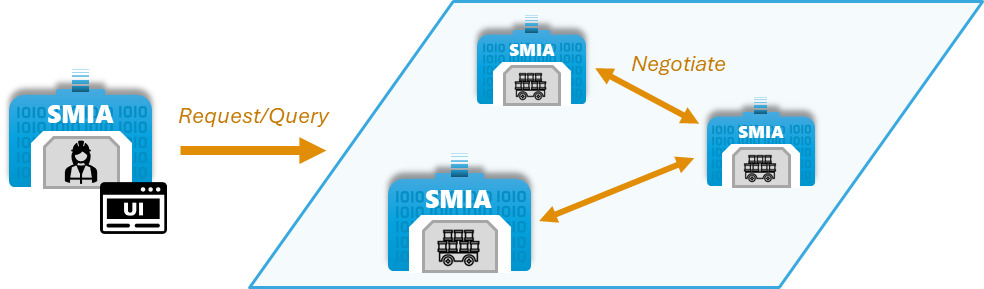
The objective is to enable operators to manage logistics through efficient transports. The efficiency of the transport is achieved by considering that each robot is limited in relation to the weight of the load, so the operator must know which robots are capable of performing each transport, and can request them to send or pick up products. Since it is possible for several robots to meet the transport weight requirement, it is possible to decide how the transport will be performed: by selecting a specific robot or by launching a negotiation request among the contenders for the most suitable option to perform it.
The operator represents a worker who must be able to interact with the system in order to perform the transport requests, so a Graphical User Interface (GUI) is required to interact within the SMIA ecosystem. On the other hand, it should be noted that the experiments have been performed in a simulated scenario for the ROS Noetic distribution including Turtlebot 3 Waffle Pi robots. The following figure graphically represents the use case:
Development of the use case
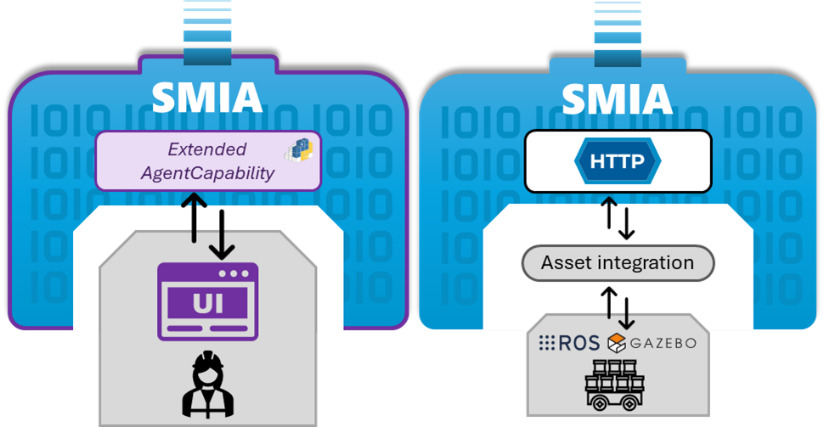
The assets identified in this case study are physical, but operator accessibility is achieved through a GUI, while ROS-based robots can be managed through HTTP-based asset integration. The SPADE development platform provides the ability to add customized, web-accessible GUIs to the agents. Using this functionality, an extension of SMIA has been developed that adds a new agent capability which is in charge of managing the GUI offered by SPADE. In this way the operator can interact within the SMIA ecosystem. For transport robots it is not necessary to extend SMIA, since SMIA base presents connection with active via HTTP. Both cases are graphically presented in the following figure:
Deployment of the use case
For this use case it has been decided to deploy SMIA using the Docker Compose method, as it offers the possibility of a self-contained deployment. This way, everything necessary is added in the docker-compose-yml file and the complete use case can be deployed with a simple command, as Docker Compose takes care of starting the containers and enabling communication between them.
docker-compose.yml file of the use case
services:

  smia-robot-1:
    image: ekhurtado/smia:latest-alpine
    container_name: smia-robot-1
    environment:
      - AAS_MODEL_NAME=SMIA_TransportRobot_article_1.aasx
      - AGENT_ID=transportrobot001@ejabberd
      - AGENT_PSSWD=gcis1234
    depends_on:
      xmpp-server:
        condition: service_healthy
    volumes:
      - ./aas:/smia_archive/config/aas

  smia-robot-2:
    image: ekhurtado/smia:latest-alpine
    container_name: smia-robot-2
    environment:
      - AAS_MODEL_NAME=SMIA_TransportRobot_article_2.aasx
      - AGENT_ID=transportrobot002@ejabberd
      - AGENT_PSSWD=gcis1234
    depends_on:
      xmpp-server:
        condition: service_healthy
    volumes:
      - ./aas:/smia_archive/config/aas

  smia-operator:
    image: ekhurtado/smia-use-cases:latest-operator
    container_name: smia-operator
    environment:
      - AAS_MODEL_NAME=SMIA_Operator_article.aasx
      - AGENT_ID=operator001@ejabberd
      - AGENT_PSSWD=gcis1234
    depends_on:
      xmpp-server:
        condition: service_healthy
    volumes:
      - ./aas:/smia_archive/config/aas
    ports:
      - 10000:10000

  xmpp-server:
    image: ghcr.io/processone/ejabberd
    container_name: ejabberd
    environment:
      - ERLANG_NODE_ARG=admin@ejabberd
      - ERLANG_COOKIE=dummycookie123
      - CTL_ON_CREATE=! register admin localhost asd
    ports:
      - "5222:5222"
      - "5269:5269"
      - "5280:5280"
      - "5443:5443"
    volumes:
      - ./xmpp_server/ejabberd.yml:/opt/ejabberd/conf/ejabberd.yml
    healthcheck:
      test: netstat -nl | grep -q 5222
      start_period: 5s
      interval: 5s
      timeout: 5s
      retries: 10
Note
Notice how the base image of the SMIA operator is different. This is because the operator is based on an extended SMIA, so a new Docker image has been generated.
SMIA Operator dashboard
During the development of the SMIA Operator extension, a dashboard was designed to facilitate the discovery of available SMIAs and the user’s use of transport requests to those SMIAs. The dashboard is divided into three sections (External SMIAs loader, Available capabilities and skills, and SMIA candidates), following the workflow described in the SMIA ecosystem: SMIA Operator guide.
The following figure shows the dashboard as displayed in this use case, with two transport robots available and the EfficientTransport capability selected:

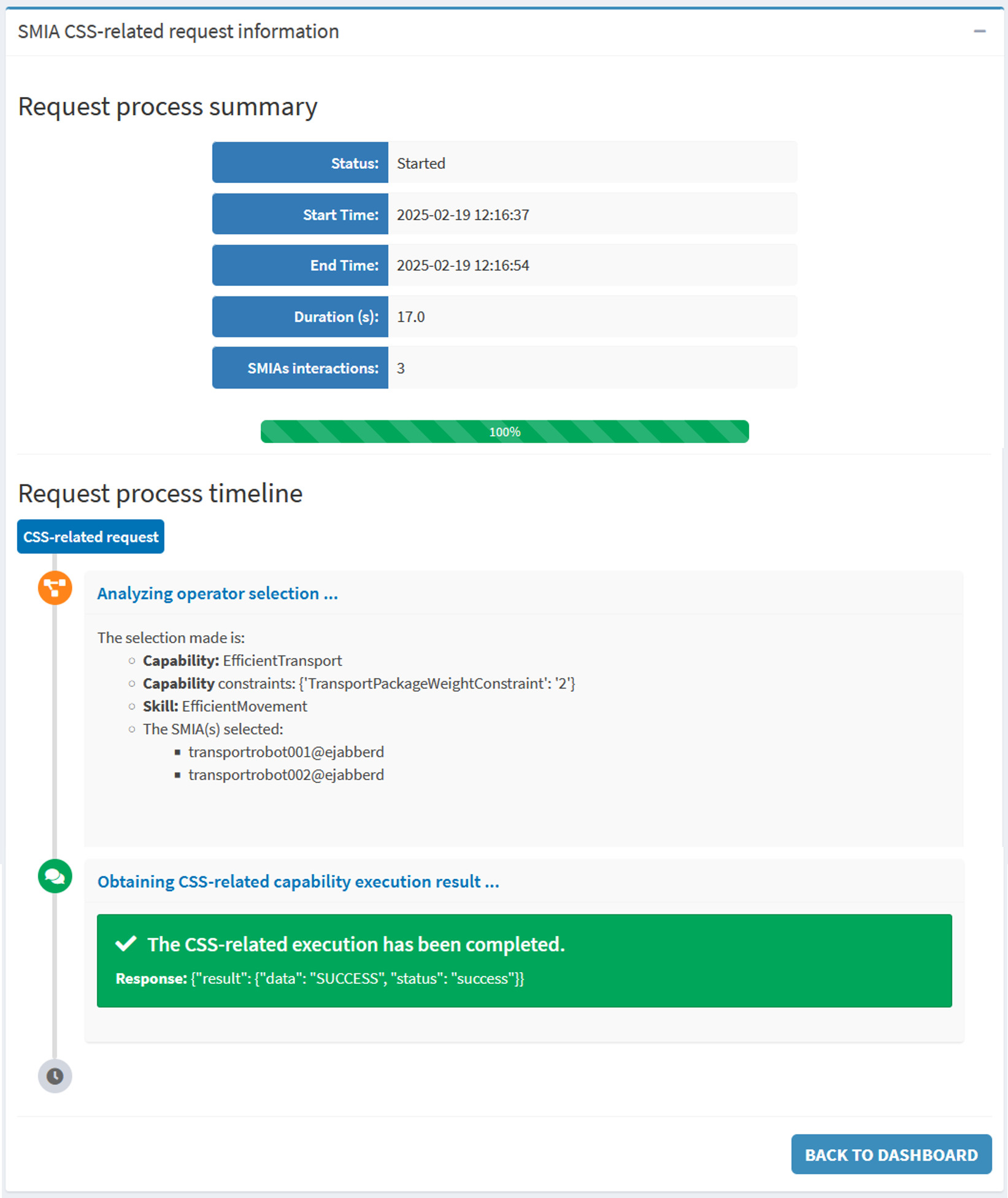
When the capability request is completed, the execution information is shown on a results page with a timeline of the performed steps:
See also
For a detailed explanation of the dashboard layout, the complete execution workflow, and installation instructions, refer to the SMIA ecosystem: SMIA Operator guide.
Use case results
During the development of the case study and the tests performed in its application, some results and conclusions have been obtained:
Having a standard such as AAS as a base, although it may be complex at first, offers a lot of advantages.
The inclusion of an architectural style focused on flexible manufacturing such as the CSS model offers simplicity in encapsulating asset functionality.
A clear and simple dashboard is necessary to simplify the use of complex industry standards based solutions.
It has been concluded that an efficient discovery system is necessary to know the available SMIAs and therefore the available assets. This is because a global knowledge of the system is necessary in solutions that require interactions between different components.